
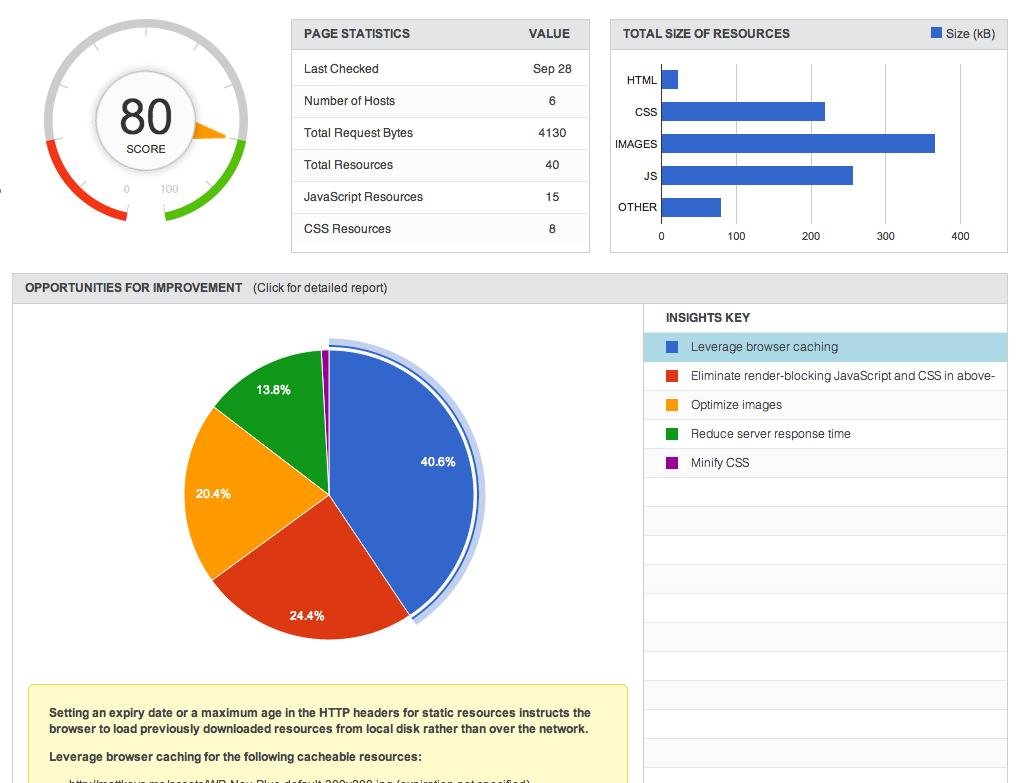
Website speed is an important part of building a successful website.
Visitors expect websites to respond quickly, especially when browsing on mobile devices. A slow website can make navigation frustrating and may affect how visitors interact with your content, forms, and products.
Performance is also an important technical consideration for search engine optimization.
Why Website Speed Matters
When a website takes too long to load, visitors may leave before interacting with the page.
A faster website can help provide:
- Better user experience
- Easier navigation
- Better mobile usability
- Improved engagement
- Smoother shopping experiences
- More efficient browsing
Common Causes of Slow Websites
Many different factors can affect website performance.
Large Images
High-resolution images that are not optimized can significantly increase page size.
Too Many Plugins
On WordPress websites, unnecessary or poorly optimized plugins can add scripts and resources that affect performance.
Excessive JavaScript
Third-party scripts, tracking tools, animations, and other JavaScript resources can increase loading requirements.
Poor Hosting
Hosting performance can affect server response times and overall website performance.
Unoptimized Database
Large databases, unnecessary revisions, transients, and other data can contribute to performance issues.
How to Improve Website Speed
Optimize Images
Compress images and use appropriate dimensions and formats.
Use Caching
Caching can reduce the amount of work required to generate pages repeatedly.
Minimize Unnecessary Resources
Remove unused plugins, scripts, styles, and third-party resources where appropriate.
Optimize CSS and JavaScript
Reduce unnecessary code and load resources efficiently.
Improve Hosting
A suitable hosting environment can provide better server resources and response times.
Optimize the Database
Regularly review unnecessary database data and optimize database performance.
Website Speed and Mobile Users
Mobile users may have different network conditions and device capabilities compared with desktop users.
A website should therefore be tested on different screen sizes and devices.
Pay attention to:
- Navigation
- Images
- Buttons
- Forms
- Layout shifts
- Font loading
- Interactive elements
Website Speed and SEO
Search engines consider page experience and performance-related signals as part of their broader systems.
However, speed should not be optimized in isolation.
A successful website also needs:
- Useful content
- Good website structure
- Relevant information
- Mobile usability
- Technical SEO
- Good user experience
How to Test Website Performance
Performance can be reviewed using tools that measure factors such as:
- Loading performance
- Core Web Vitals
- Server response
- Image size
- JavaScript
- CSS
- Mobile performance
Regular testing helps identify new performance issues after website updates.
Final Thoughts
Website performance is an ongoing process. New plugins, images, content, integrations, and functionality can affect performance over time.
Regular monitoring and optimization can help keep your website fast, stable, and user-friendly.
WebApp Xperts provides website performance optimization for WordPress, WooCommerce, and other website platforms.